Your entire rosterunder one login
One Studio subscription, a Crew, puts every artist, promoter and venue page under a single dashboard, team and bill. Assign members once, deploy them anywhere, and keep full visibility across the structure.
One bill for the whole structure.
★★★★★Built for agencies, labels and collectives across Europe.
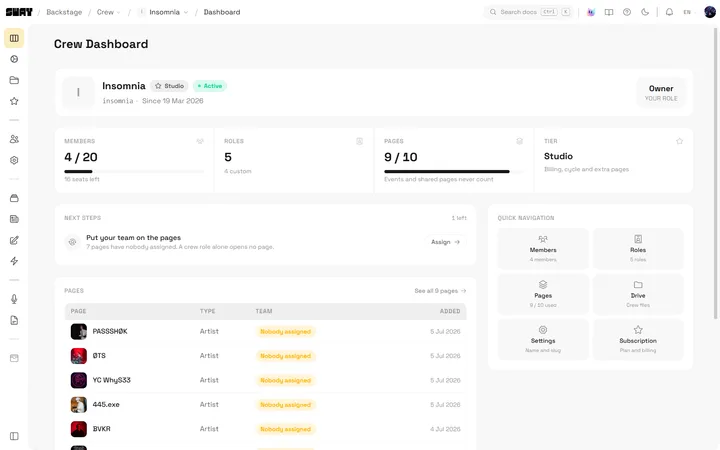
Your whole structure at a glance
Members, roles, pages used against your cap and your current tier, all on one screen. Log in and know exactly where the agency stands.
- Members and roles at a glance
- Pages used against your plan cap
- Your current tier, always visible
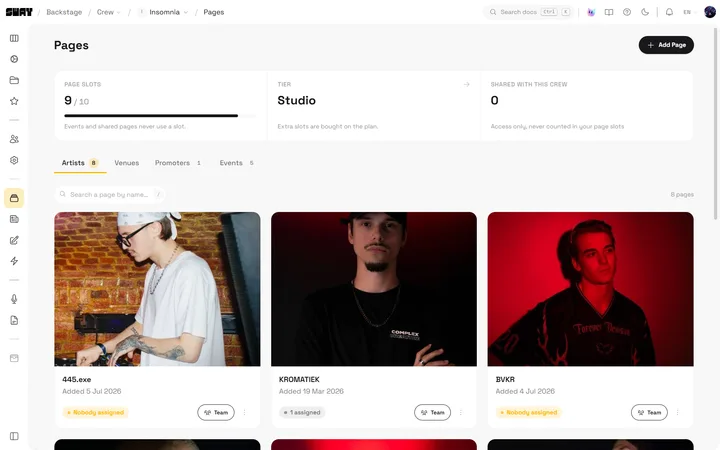
Every client page under one login
Artist, promoter and venue pages live side by side in one roster list, with a used-against-cap counter and the members assigned to each one. No account juggling.
- Mixed artist, promoter and venue pages
- Used-against-cap page counter
- Assigned members shown per page
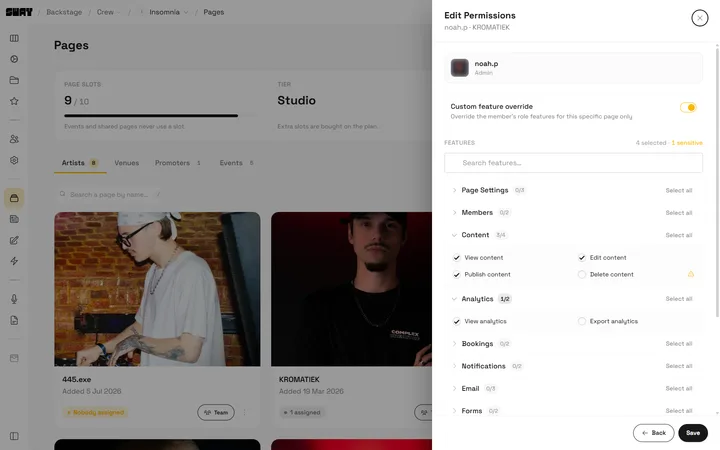
Let a client run only their page while you keep full visibility
Assign a member to a single page and toggle exactly which features they get with per-page override checkboxes. Clients touch only what you allow, you keep oversight of everything.
- Assign a member to one page only
- Per-page feature override toggles
- Full agency visibility on every page
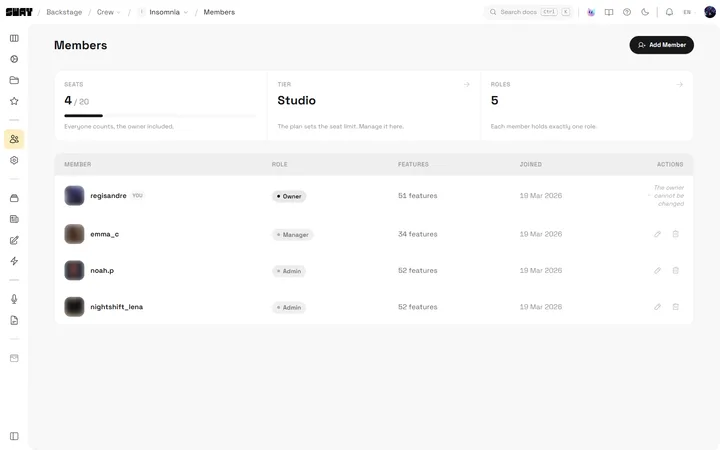
Add your team once, deploy them anywhere
One Crew roster of members with their role, feature access and join date. Add a teammate once and assign them across as many pages as the job needs.
- One roster: member, role, features, joined
- Add a member once, use them anywhere
- No shared logins across clients
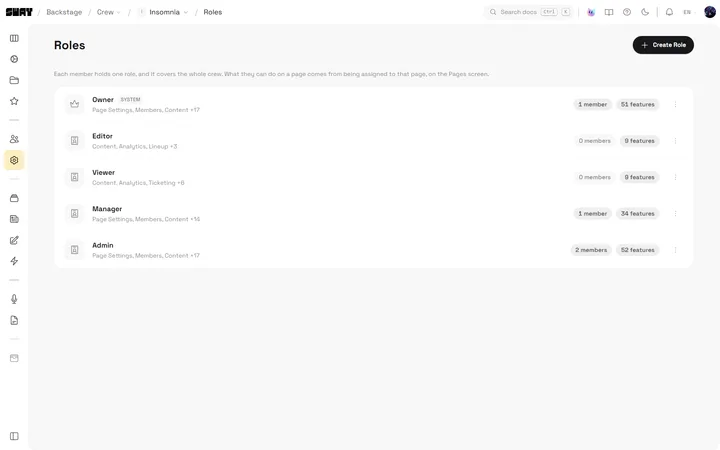
Build reusable roles, not all-or-nothing access
Create named roles from a feature checklist and reuse them across the roster. Reader, manager and admin levels plus your own custom sets, applied consistently everywhere.
- Create roles from a feature checklist
- Reuse roles across the whole roster
- Reader, manager and admin levels built in
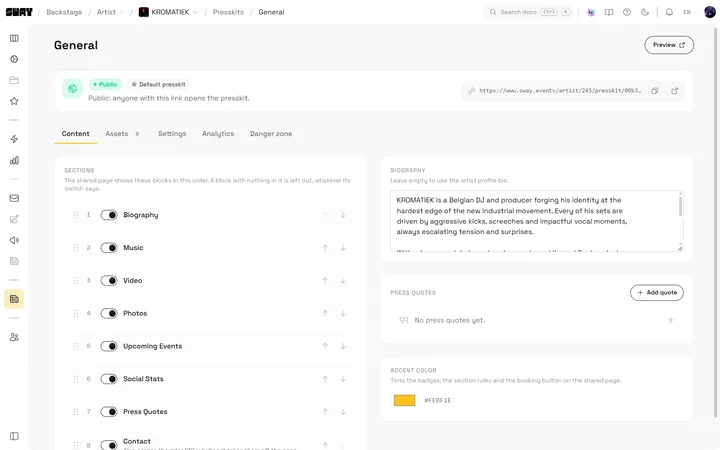
Every act's booking material under one roof
Manage the press kit for every act in your roster from one grid. Bookers get one trusted link per artist, ten kits per page on Studio and no cap on Roster, kept current by your whole team.
- Press kits for every act in one grid
- One trusted booking link per artist
- Ten kits per page on Studio, no cap on Roster
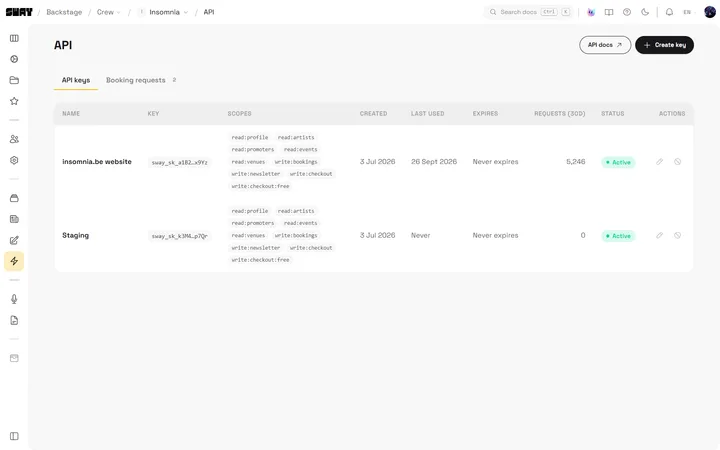
A website for any page in the roster
Put a client page on its own domain, with a site that reads its events, line-ups and tickets from Sway through the API and an admin panel the client can use. Checkout and payouts stay on Sway.
- One domain per page in the roster
- Events and tickets synced from Sway
- Included from Studio
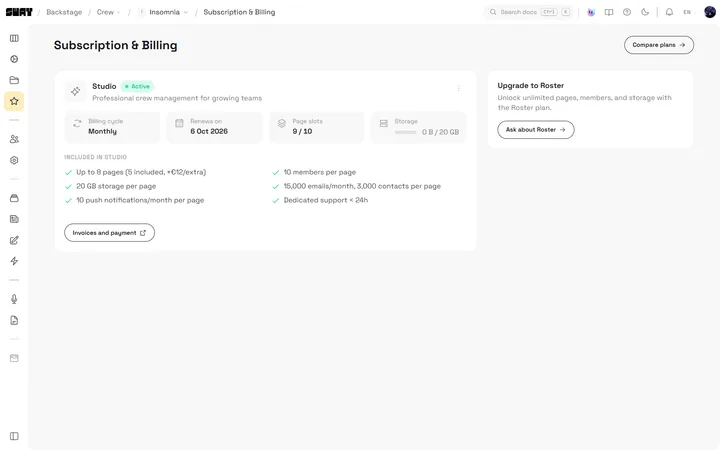
One bill for the whole structure
Studio and Roster plans put pages, storage, team seats, email and support on a single subscription. Compare tiers and manage the entire agency's billing in one place.
- Studio and Roster plan comparison
- Pages, storage, seats and email in one plan
- One subscription for the whole agency
Included across the whole Crew
- Per-page email quotas, no mixed audiences
- Reader, manager and admin permission levels
- Mixed artist, promoter and venue pages in one Crew
- A consolidated Crew wallet on Studio
- Storage shared across the roster
- Priority support on higher tiers
- A Drive per page, spending the crew's storage
- Forms on every page, with their responses and statistics
One Crew, not a pile of separate accounts
Managing a roster on Sway, side by side with juggling separate logins on the platforms you know.
| Feature | Sway | Shotgun | Separate logins |
|---|---|---|---|
| Mixed artist, promoter and venue pages in one Crew | |||
| Add a team member once, assign anywhere | |||
| Reusable custom roles from a feature checklist | |||
| Per-page access overrides for clients | |||
| One dashboard rollup across the roster | |||
| One subscription and bill for the structure |
Comparison reflects general public positioning and is provided for guidance. Verify current competitor terms before relying on it.
From one page to a whole roster
Start your Crew
Pick a Studio or Roster plan and create your Crew, the shared home for your whole agency.
Add your pages
Bring in your artist, promoter and venue pages, up to your plan's cap, all under one login.
Invite your team
Add members once, build custom roles and assign per-page access exactly where it belongs.
Run it from one dashboard
Track the whole roster, manage press kits and settle one bill for the entire structure.

One plan for the whole agency
Studio and Roster plans cover your pages, team seats, storage and email on a single subscription. Compare the tiers and pick the one that fits your roster.
See pricingGood to know
- What is a Crew?
- A Crew is a shared workspace that holds your whole roster: artist, promoter and venue pages, your team members, your custom roles and one subscription. It is how an agency runs everything from a single login.
- Can one Crew hold different types of pages?
- Yes. A single Crew can mix artist, promoter and venue pages in the same roster, so your whole structure lives under one dashboard rather than scattered across separate accounts.
- How do per-page access overrides work?
- When you assign a member to a page, you can toggle exactly which features they get on that page. A client can run only their own page while your agency keeps full visibility across the roster.
- Do team members need separate logins per client?
- No. You add each member to the Crew once, then assign them to as many pages as they need. There are no shared or duplicated logins across clients.
- How is billing handled for the whole roster?
- The Crew runs on one Studio or Roster subscription that covers pages, storage, team seats and email. You manage the entire agency's billing in one place instead of paying per page.
Run the whole roster from one place
Put every artist, promoter and venue page under one Crew, one team and one bill.
Start your CrewOne bill for the whole structure.